

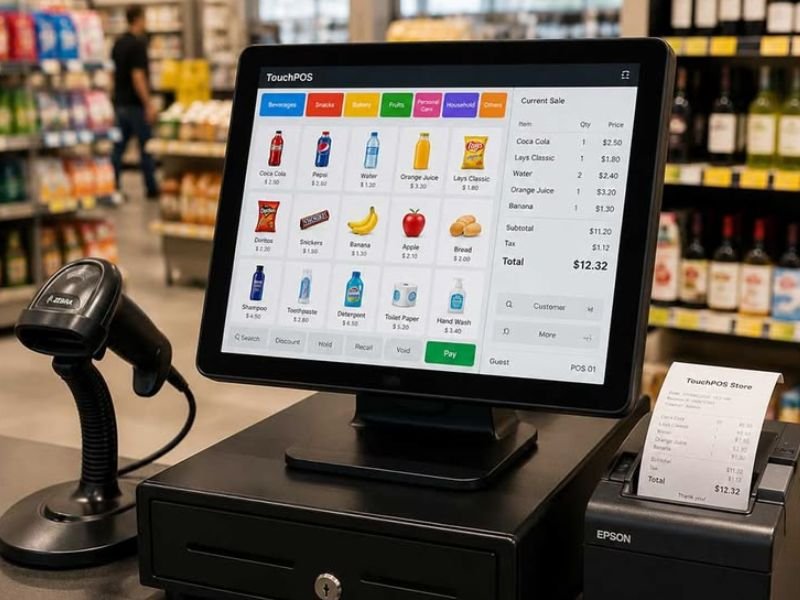
Running a business in 2026 requires more than a simple cash register. Whether you own a retail store, restaurant, café, pharmacy, supermarket, or service business, your Point of Sale (POS) system has become the central hub of your daily operations.
The right POS system doesn't just process payments—it helps you manage inventory, understand customer behavior, track sales in real time, and make smarter business decisions.
If you're planning to invest in a new POS system this year, here are the most important features you should look for.
1. Cloud-Based Access
Modern businesses need access to their data from anywhere. A cloud-based POS allows you to monitor sales, inventory, and business performance whether you're at your store, at home, or traveling.
Look for a system that offers:
- Real-time reporting
- Secure cloud backups
- Multi-device access
- Automatic software updates
2. Offline Mode
Internet outages happen. Your business shouldn't stop because your connection does.
A reliable POS system should continue processing sales even when the internet is unavailable and automatically synchronize your data once the connection is restored. Offline capability has become one of the most valuable features for businesses in 2026.
3. Powerful Inventory Management
Inventory management is no longer optional.
Your POS should help you:
- Track stock levels in real time
- Receive low-stock alerts
- Manage product variations
- Handle barcode scanning
- Monitor supplier purchases
- Reduce inventory losses
Better inventory control leads to fewer stockouts and improved profitability.
4. Multi-Location Support
If you operate more than one store—or plan to expand—you'll need a POS that can manage multiple locations from one dashboard.
The best systems allow you to:
- Compare sales across branches
- Transfer inventory between stores
- Manage employees by location
- Generate consolidated reports
This saves time and keeps your operations organized as your business grows.
5. Fast and Easy Checkout
Customers expect quick service.
Your POS should make checkout simple with features such as:
- Barcode scanning
- Touchscreen interface
- Multiple payment methods
- Receipt printing
- Discount management
- Quick product search
A faster checkout means shorter queues and happier customers.
6. Detailed Business Reports
Successful businesses rely on data, not guesswork.
Choose a POS that provides reports on:
- Daily and monthly sales
- Best-selling products
- Profit margins
- Employee performance
- Customer purchasing trends
- Inventory movement
These insights help you identify opportunities and make informed decisions.
7. Customer Relationship Management (CRM)
Keeping existing customers is often more profitable than finding new ones.
Look for CRM features such as:
- Customer profiles
- Purchase history
- Loyalty programs
- Reward points
- Promotional campaigns
- Personalized discounts
These tools encourage repeat business and improve customer satisfaction.
8. Strong Security
Your POS handles valuable business and customer information.
A secure system should include:
- User roles and permissions
- Encrypted data storage
- Secure cloud backups
- Audit logs
- Two-factor authentication (where available)
Protecting your data should always be a priority.
9. Scalability
Your business today won't look the same in two or three years.
Choose a POS system that grows with your business by supporting:
- Additional users
- More products
- New store locations
- Advanced reporting
- Integrations with accounting, eCommerce, and delivery platforms
A scalable solution prevents costly migrations later.
10. Industry-Specific Features
Different businesses have different needs.
For example:
Retail Stores
- Barcode management
- Stock transfers
- Promotions
- Customer loyalty
Restaurants & Cafés
- Table management
- Kitchen order tickets
- Split bills
- Menu modifiers
Pharmacies
- Batch tracking
- Expiry date monitoring
- Prescription management
Service Businesses
- Appointment scheduling
- Customer history
- Service invoicing
Choosing software designed for your industry can significantly improve efficiency.
11. Mobile and Tablet Compatibility
Many businesses now operate using tablets and smartphones.
A modern POS should work smoothly across:
- Android devices
- iPads
- Tablets
- Desktop computers
- Mobile phones
This flexibility allows staff to work more efficiently while reducing hardware costs.
12. Reliable Customer Support
Even the best software occasionally requires assistance.
Before choosing a POS provider, check:
- Support availability
- Response times
- Training resources
- Setup assistance
- Software updates
Reliable support can save valuable time when issues arise.
Final Thoughts
A POS system is no longer just a payment tool—it's the backbone of a modern business. The right solution helps you increase efficiency, reduce errors, improve customer satisfaction, and make smarter decisions using real-time business data.
When evaluating POS systems in 2026, prioritize reliability, offline functionality, cloud access, inventory management, reporting, scalability, and strong customer support. Investing in the right platform today will help your business grow with confidence tomorrow.
If you're looking for an all-in-one POS solution designed for modern businesses, Douexa provides the tools you need to manage sales, inventory, customers, and business performance from a single platform—helping you work smarter, wherever your business takes you.
